Learn SQL on data you'll actually enjoy.
Pick a world to explore.
Load any with one click in Settings → Learn SQL, or grab the raw files from the public repo — credits & example queries included.
⭐ Star Wars
61 planets and 87 characters, linked by a foreign key — perfect for learning JOINs.
"Which characters are from Tatooine?"
Data from alexisrolland/star-wars-data (SWAPI). Inspired by Cockroach Labs and the starwarsdb R package.
⚡ Pokémon
All 800 Pokémon with types and battle stats — great for SELECT, WHERE, ORDER BY,
and aggregates.
"Show the strongest Water types."
The classic Kaggle Pokémon dataset. Learning ideas from TempeHS, Yi Zheng, and lucvalsal.
🎵 Music store
A full digital music store — customers, invoices, tracks, albums and artists across 11 tables.
Great for complex joins and subqueries. Loaded by default.
"Which artist earned the most revenue?"
The Chinook sample database (MIT licensed).
🌍 World countries
All 250 countries with population, GDP, area, capital, region and languages — the perfect
playground for GROUP BY and aggregates.
"Rank continents by total population."
Country data from mledoze/countries (MIT); population & GDP from the World Bank (CC BY 4.0).
🏅 Olympic medals
Medal counts by country, sport, year and type from 1896–2016, plus a country lookup table.
Superb for joins and trend charts.
"Chart USA golds by year."
olympics.db ↓ · per-medal detail ↓
From the 120 years of Olympic history dataset (originally compiled by Sports Reference).
🦸 Marvel & DC
23,000+ comic characters with alignment, appearances and first appearance — compare
Marvel vs DC with GROUP BY and filters.
"Who has the most appearances?"
FiveThirtyEight's comic-characters data (CC BY 4.0), from the Marvel & DC wikis.
More on the way. Want one, or have data to share? Join the discussion →
Load a database in one click.
No files to move, no setup — everything installs into ~/Documents/pouncesql/learn and pins to your tree.
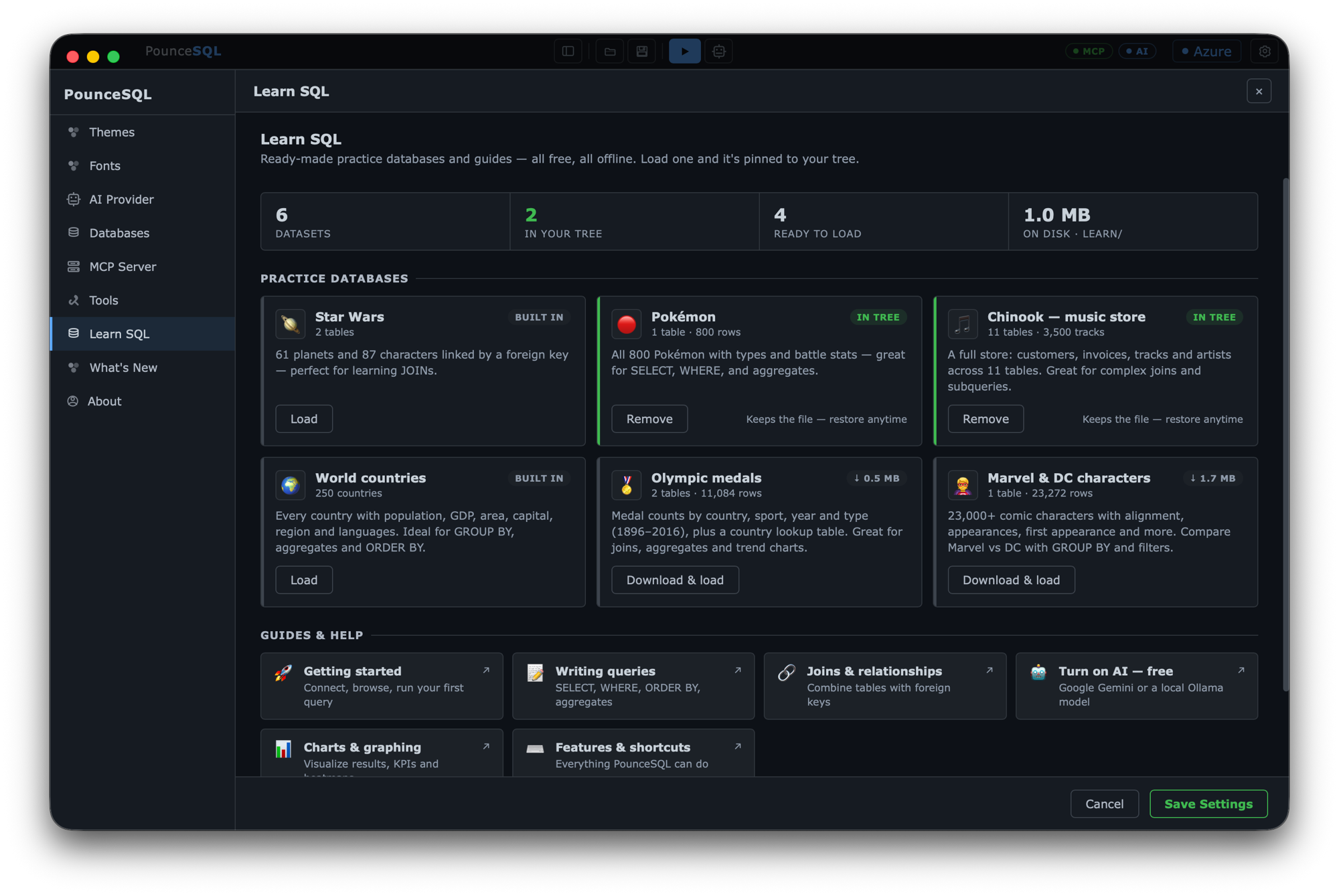
- Open Settings → Learn SQL.
- Click Load next to any database — it installs (downloading first if needed) and appears in your tree.
- Expand it to see the tables — or just ask the AI: "what's in this database?"
- Done exploring? Click Remove to hide it; reload it any time.
Prefer to do it by hand? Download a .db from the Databases tab, then use Add → SQLite → Browse… in the tree.
Tip: right-click any table to preview rows, count them, or generate a starter query.
Turn on the assistant for $0.
The AI is optional and off until you add a provider. Both of these are free.
🟢 Google Gemini free tier
- Go to aistudio.google.com/apikey and sign in.
- Click Create API key and copy it.
- In PounceSQL: Settings → AI Provider → Google, paste the key.
- Pick
gemini-2.5-flashand start chatting. Free-tier limits are generous for learning.
🔒 Ollama 100% local
- Install Ollama (or
brew install ollama). - Pull a coding-tuned model:
ollama pull qwen2.5-coder - In PounceSQL: Settings → AI Provider → Ollama, endpoint
http://localhost:11434. - Load the model list, pick your model — nothing ever leaves your Mac.
Prefer the big models? A few dollars of OpenAI or Anthropic credits go a long way.
From your first query to charts.
Paste each query into the editor and hit Run (⌘↵), or ask the AI. Work top to bottom — every lesson builds on the last.
-
1
Your first query
pokemon.dbSELECT chooses columns, WHERE filters rows, ORDER BY sorts, LIMIT caps the count. Find the ten hardest-hitting Fire types:
SELECT name, type1, attack
FROM pokemon
WHERE type1 = 'Fire'
ORDER BY attack DESC
LIMIT 10;
Try next: change
'Fire'to'Water', or sort byspeed. -
2
Count & group
pokemon.dbAggregate functions summarise many rows. GROUP BY makes one row per group — here, per type — with a count and an average:
SELECT type1,
       COUNT(*)            AS count,
       ROUND(AVG(total), 0) AS avg_power
FROM pokemon
GROUP BY type1
ORDER BY count DESC;
Try next: add
HAVING COUNT(*) > 40to keep only the common types. -
3
Join two tables
starwars.dbReal data lives in linked tables. A JOIN follows the foreign key — each character's
planet_idpoints at a planet:SELECT people.name, planet.name AS homeworld FROM people JOIN planet ON people.planet_id = planet.id WHERE planet.name = 'Tatooine';
Try next: swap in
'Naboo', or addpeople.heightand sort by it. -
4
Let the AI write it
any database · AIDon't know the syntax yet? Type the question in the AI Assistant and it writes engine-correct SQL you can read, tweak, and run with Use in editor:
Ask: “Which homeworld has produced the most characters?”
Read the JOIN + GROUP BY it generates — that's lesson 2 and 3 combined. Then ask it "explain that query."
-
5
See it as a chart
any database · AINumbers are easier to grasp as pictures. Ask for a chart and PounceSQL renders it inline — then export it as PNG:
Ask: “Chart the average attack by Pokémon type.”
Also try: "give me the KPIs for this database" for a dashboard of headline numbers.
-
6
Map the whole schema
any database · AINew database? Get the lay of the land instantly — the AI draws an entity-relationship diagram of the tables and how they connect:
Ask: “Diagram the relationships in this database.”
Now you can see which columns to JOIN on before you write a line of SQL.
Stuck? Here's where to look.
Everything you need to keep learning — guides, answers, and people who can help.
az login session.
💬
Ask the communityQuestions, ideas, and dataset requests in Discussions.
📦
Sample-databases repoRaw files, schemas, credits and example queries.
✨
What's newLatest features and how to update.